Softerra LDAP Administrator 2010.2 - What's New?
Softerra LDAP Administrator 2010.2 is a major release that offers several new features, improvements and user interface refinements.
Below are the highlights of the major feature additions and changes in Softerra LDAP Administrator 2010.2 from the previous version, Softerra LDAP Administrator 2010.1.
LDAP Request Log
LDAP Request Log is a new feature introduced in this release that allows keeping track on LDAP requests sent by LDAP Administrator and responses received from the server. This lets you monitor the interconnection between the application and LDAP server on a more detailed level, track errors and much more. The information contained in the log can be presented in LDIF or DSML2 formats, which allows importing log data to the server thus reproducing the work of the application.
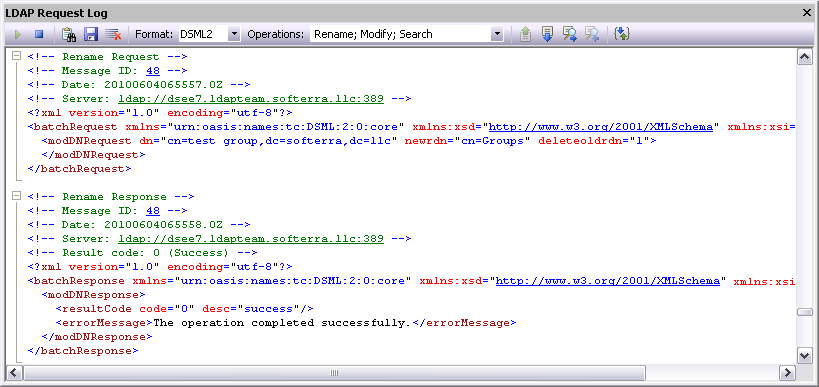
LDAP Request Log has many helpful features like syntax highlighting, outlining, search and navigation functions, different modes for representing log information, etc. introduced to simplify the work with log data.
Navigation
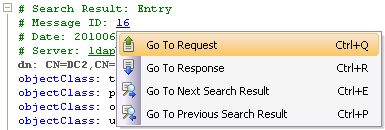 LDAP requests and responses returned by the server are often represented in the log as separate entries. That's why, along with usual search, the request log has navigation commands, which allows you to quickly switch between a request entry and the corresponding server response entry or between search result entries.
Text Outlining
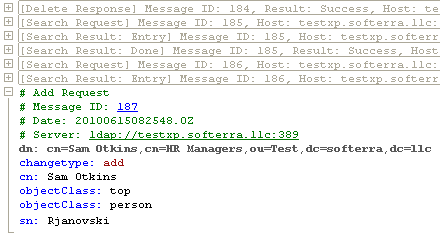 To increase readability and simplify the work with LDAP Request Log that may contain lots of records we've added the outlining feature. This feature allows you to automatically or manually collapse log records, which makes viewing and navigating through the log significantly easier.
Syntax Highlighting
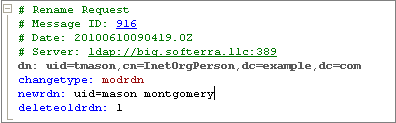 In order to make the reading of log information an easy process, LDAP Request Log supports syntax coloring based on the LDIF and DSMLv2 formats. Each lexical element available in the log is highlighted with its own color.
Importing Data from CSV Files
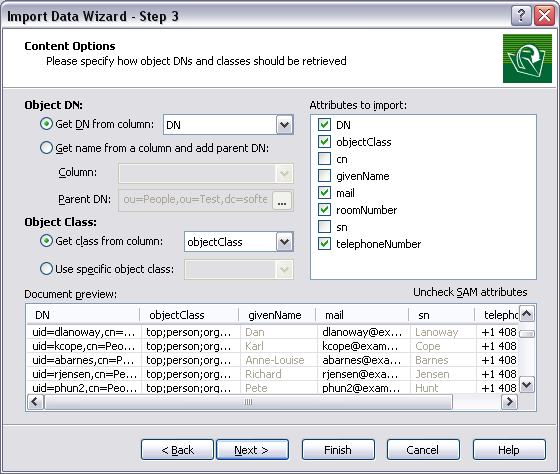
Although the CSV format is not intended for importing directory data, rather often these data are stored in CSV files, and a corresponding need arises to import these data to an LDAP server. That's why, following the wishes of many users, in this release of LDAP Administrator we have introduced a functionality to import directory data from files containing information in CSV format. During CSV data import, LDAP Administrator enables to specify different document formatting options and also define how object DNs and object class information should be retrieved from this file.
Easy Editing of Referrals
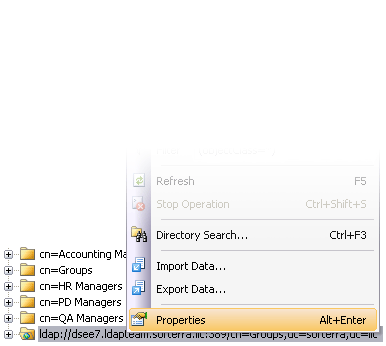
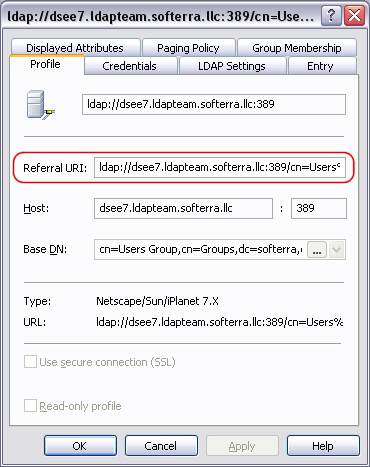
Sometimes, when working with the application, a need arises to modify the LDAP URL, to which a referral refers. Previously, for this purpose users had to enable the ManageDsaIT control and modify the 'ref' attribute of the referral object. Now you can change the value of the 'ref' attribute via property page of the referral node.
Automatic Sorting of Items in Scope Pane
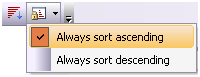 In most cases, when working with an LDAP server, the sorting of data is performed on the server side and the server returns data in some order. Sometimes, server does not provide any sorting functionality or server-side sorting appears to be a much more costly operation than client-side sorting.For such cases, according to wishes of many users, we have added automatic sorting of elements in the Scope Pane.
Object Class Specific Icons
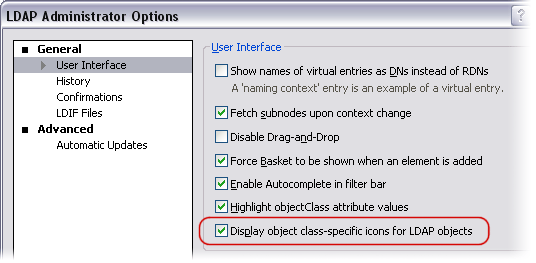
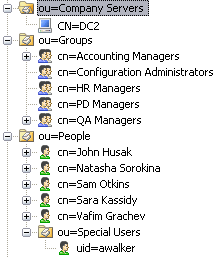
From now on, LDAP Administrator can display object class-specific icons for most popular LDAP object classes. This feature helps you quickly understand what object class a certain entry is instantiated from. Especially, this feature is handy when working with containers that contain a lot of LDAP entries of different object classes.
Schema-Aware Sorting in List View
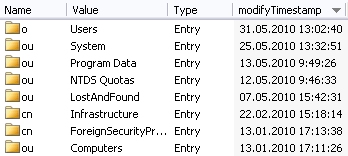 The sorting of List View elements by LDAP attribute values has been improved. Now the sorting is performed not just by comparing strings of attributes values, but is based on the type of data the attribute contains. For example, if you sort elements by an LDAP attribute containing dates, all values will be sorted by dates rather than by string representation of these dates.
Other Improvements
Features of LDAP Administrator have gained some other minor, but pleasant improvements. Some of the changes are not visible to the user, but still they make the work of application much better.
Improved Directory Search Performance
Entensive use of Directory Search especially when handling large volumes of data, often resulted in its slow operation. In order to solve this problem, we have significantly refactored the Directory Search code and achieved a considerable increase in performance: the search itself is running faster and required less memory, the process of storing search results has speeded up dramatically.
moddn and modrdn Support for Sun Directory Servers
For Sun Directory Server from version 6.1, the support of moddn and modrdn operations has been added. Now if you rename or move an entry that is not a leaf node and your Sun Directory server supports the modify DN operation, LDAP Administrator will use LDAP-specific modrdn or moddn operation rather than recursively copy the content of this entry to a new location and than delete the old one.
Handling AD Primary Groups
From now on, when working with group membership on AD servers, LDAP Administrator correctly handles group membership based on the PrimaryGroupID attribute.For example, all Active Directory users by default are members of the Domain Users group via the primary group membership. Now LDAP Administrator shows correctly members of the Domain Usersgroup.
Import Data Wizard Enhancements
Import Data Wizard has undergone important modifications. Along with the implementation of CSV files import, we have also enhanced document format identification and errors reporting.
New Built-in Reports
Now LDAP Administrator is enriched with MS Exchange-specific reports. These reports let Exchange server administrators and managers obtain detailed information on users distribution lists, mailbox stores, e-mail addresses, proxy addresses, etc.